

Description
WP-AutoInsight brings AI content generation into your WordPress dashboard without a platform subscription attached. It isn’t a SaaS or another subscription service. You pay for what you use. Connect your OpenAI, Anthropic, Google, or Perplexity accounts to the plugin, and your site will generate content at low cost, for a fraction of what most SaaS tools charge $50-100 per month.
Whether you’re a small business keeping a blog active, an agency managing content for clients, or a blogger who’d rather talk through ideas than type them, WP-AutoInsight creates, you review, and you publish.
Key Features
-
Generate content in more ways than you’d expect
- Write full blog posts from a keyword list, automatically or on demand
- Turn voice notes or meeting recordings into draft posts. Upload audio, get a structured article
- Create infographics from any existing post, saved directly to your Media Library
- Pull research-backed content through Perplexity Sonar, complete with clickable source citations
-
Choose the AI. Pay the AI directly.
- Supports OpenAI, Anthropic Claude, Google Gemini, and Perplexity models. Switch models anytime you want
- Each model shows an estimated cost per post before you choose it
- Your API keys, their actual rates. No markup, no lock-in
-
Nothing publishes without your approval
- Content saves as a draft by default. Review before anything goes live
- Content History tracks every generated post: which model, which status, when
- Set tone, keywords, categories, and length once. The plugin will follow your rules
-
Works with everything already on your site
- Native Gutenberg block output. Not an HTML blob in a classic editor
- Yoast SEO and RankMath: focus keywords, meta descriptions, and social excerpts generated automatically
- Featured images via DALL-E 3, Stability AI, or Gemini image generation
-
For developers
- Store API keys in wp-config.php for maximum security, or use WordPress 7.0’s native Connectors API
- Configurable per post type, clean option names, no proprietary lock-in
Configuration
API Keys
You’ll need at least one of the following API keys:
* OpenAI API key (for GPT models and DALL-E)
* Claude API key (for Claude 4.5 models)
* Gemini API key (for Google’s AI)
* Perplexity API key (for web-grounded content with citations)
* Stability AI key (optional, for alternative image generation)
For enhanced security, add your API keys to wp-config.php:
php

define('OPENAI_API', 'your-key-here');

define('CLAUDE_API', 'your-key-here');

define('GEMINI_API', 'your-key-here');

define('PERPLEXITY_API', 'your-key-here');

define('STABILITY_API', 'your-key-here');
Content Settings
- Select your preferred AI model
- Set your desired content tone
- Configure keywords and categories
- Adjust token limits and scheduling
- Enable/disable image generation
- Set up email notifications
Support
For support, feature requests, or to contribute to development:
* Visit the WordPress support forum
* Submit issues on GitHub
* For custom integrations or consulting: phalkmin@protonmail.com
* Support development:
Screenshots
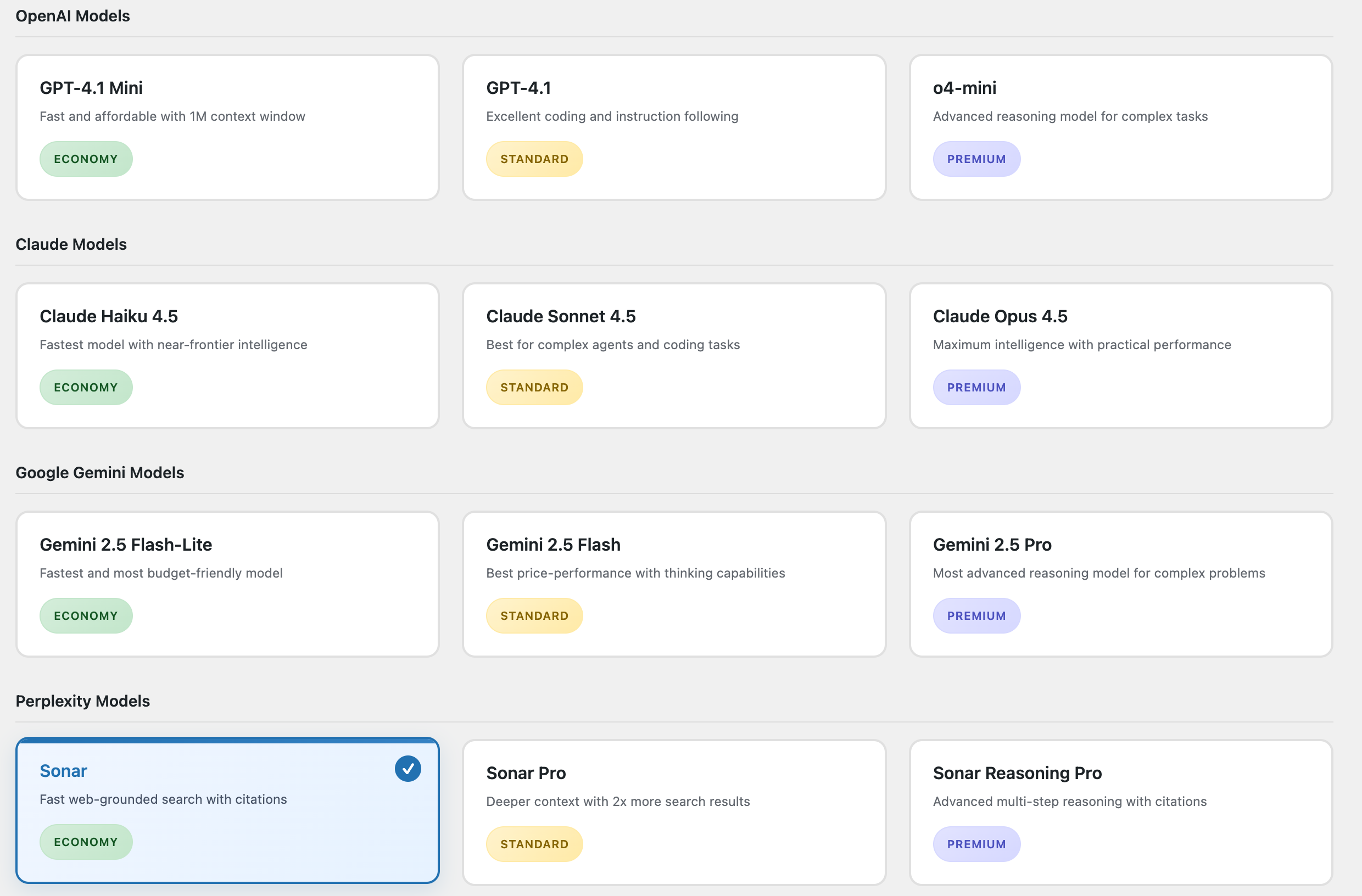
Plugin settings page – Configure API key, keywords, and other options. 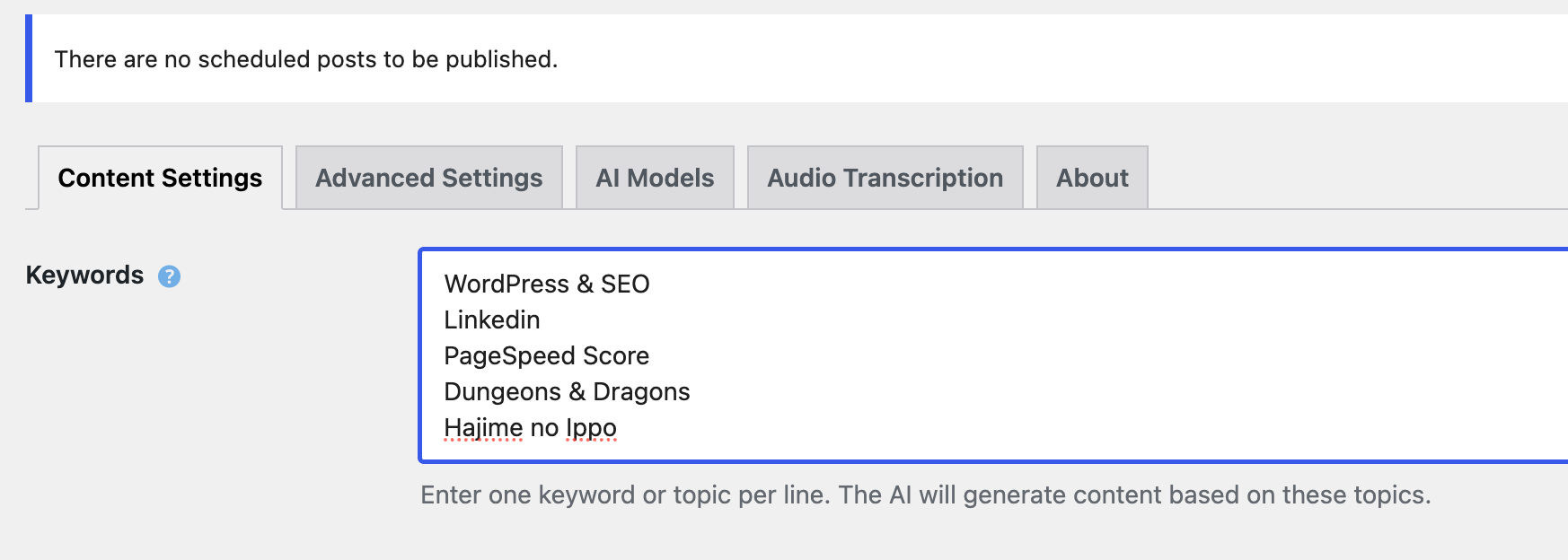
Example generated blog post using Gutenberg blocks.
Installation
- Upload
wp-autoinsightto the/wp-content/plugins/directory - Activate the plugin through the ‘Plugins’ menu in WordPress
- Navigate to ‘WP-AutoInsight’ in your admin menu
- Configure your preferred AI service API keys
- Set up your content preferences and posting schedule
FAQ
-
How do I get an OpenAI API key?
-
To use OpenAI models (GPT-4.1, o4-mini), sign up at OpenAI and get your API key:
1. Go to https://platform.openai.com/api-keys
2. Sign up or log in to your account
3. Click “Create new secret key”
4. Copy and paste the key into WP-AutoInsight’s Advanced Settings -
How do I get a Claude API key?
-
To use Claude models (Haiku, Sonnet, Opus), you need an Anthropic API key:
1. Visit https://console.anthropic.com/
2. Create an account or sign in
3. Go to API Keys section
4. Generate a new API key
5. Add it to WP-AutoInsight’s Advanced Settings -
How do I get a Gemini API key?
-
To use Google’s Gemini models, get your API key from Google AI Studio:
1. Go to https://aistudio.google.com/app/apikey
2. Sign in with your Google account
3. Click “Create API key”
4. Copy the key to WP-AutoInsight’s Advanced Settings -
How do I get a Stability AI API key?
-
For image generation fallback with Stability AI:
1. Visit https://platform.stability.ai/
2. Create an account and sign in
3. Go to API Keys in your account settings
4. Generate a new API key
5. Add it to Advanced Settings for image generation -
How do I select AI models?
-
WP-AutoInsight 3.0 features a visual model selection interface:
1. Go to WP-AutoInsight > AI Models
2. Browse model cards organized by provider (OpenAI, Claude, Gemini)
3. Click on your preferred model card to select it
4. Each model shows cost tier (Economy/Standard/Premium) and capabilities
5. Save your selection -
How can I customize the generated content?
-
You have extensive customization options:
– Keywords: Set topics and focus areas in Content Settings
– Tone: Choose from Professional, Casual, Friendly, or Custom tone
– Categories: Select WordPress categories for posts
– Token Limits: Control content length in Advanced Settings
– SEO: Enable automatic SEO metadata generation
– Images: Toggle featured image generation on/off -
Can I use audio files to create blog posts?
-
Yes! WP-AutoInsight 3.0 includes audio transcription:
1. Enable Audio Transcription in settings
2. Upload an audio file to your Media Library
3. Edit the audio file and click “Transcribe & Create Post”
4. The AI will convert speech to text and create a formatted blog post
5. Supports MP3, WAV, M4A, WebM, FLAC formats up to 25MB -
How do I create infographics from my posts?
-
The infographic feature analyzes your content and creates visuals:
1. Open any existing post for editing
2. Look for the “AI Infographic Tools” meta box
3. Click “Create Infographic”
4. The AI analyzes your content and generates a visual infographic
5. The image is saved to your Media Library automatically -
Can I rewrite existing posts with AI?
-
Yes, use the AI rewrite feature:
1. Edit any existing post
2. Find the “AI Content Tools” meta box in the sidebar
3. Click “Rewrite with AI”
4. The AI will improve and restructure your content while maintaining the core message
5. Review and publish the updated content -
How do I manually create posts?
-
Multiple ways to create posts manually:
– Settings Page: Click “Create post manually” in Content Settings
– Post List: Use the “Create AI Post” button on post list screens
– Quick Creation: Generate posts from the main dashboard -
Is it possible to schedule automatic content generation?
-
Yes, WP-AutoInsight offers flexible automation:
1. Go to Advanced Settings
2. Set “Schedule post creation” to Hourly, Daily, or Weekly
3. Configure your keywords and preferences
4. Posts will be automatically generated and saved as drafts
5. Optional email notifications when new posts are created -
Which post types are supported?
-
You can configure which post types show AI tools:
1. Go to Content Settings
2. Select from available post types (Posts, Pages, Custom Post Types)
3. AI buttons and tools will appear for selected post types
4. Default is set to standard WordPress Posts -
How secure are my API keys?
-
WP-AutoInsight prioritizes security:
– Store API keys in wp-config.php for maximum security
– Database storage is encrypted
– Keys are never logged or transmitted unnecessarily
– Use secure HTTPS connections for all API calls -
What’s the difference between the AI models?
-
Each provider offers different strengths:
– OpenAI: Excellent for creative and versatile content
– Claude: Great for analytical and structured content
– Gemini: Strong at factual and research-based content
– Perplexity: Generates web-grounded content with real source citations, ideal for research-heavy or news-adjacent posts
– Cost Tiers: Economy (fast/cheap), Standard (balanced), Premium (highest quality) -
How does Perplexity work differently from the other providers?
-
Perplexity searches the web in real time before generating content, then includes source citations alongside the text. Instead of generating from training data alone, it pulls from current sources and references them in the post. You can choose how citations appear: as inline hyperlinks, a references section at the bottom, or both. You can also set a recency filter to limit sources to the last day, week, month, or year. A Perplexity API key with an active paid plan is required.
-
Can I use multiple AI services together?
-
Yes, you can configure multiple API keys and switch between models:
– Set up keys for different providers in Advanced Settings
– Choose different models for different types of content
– The plugin automatically uses the appropriate service based on your selection -
Does the plugin work with SEO plugins?
-
Yes, WP-AutoInsight integrates with popular SEO plugins:
– Yoast SEO: Automatic meta descriptions, focus keywords, and social previews
– RankMath: Compatible with meta field generation
– Enable “Generate SEO Metadata” in Content Settings for automatic optimization -
What happens if content generation fails?
-
WP-AutoInsight includes robust error handling:
– Detailed error messages help identify issues
– Automatic fallbacks between different AI services
– Content is saved as drafts to prevent data loss
– Error logging helps with troubleshooting
– Email notifications for scheduled generation failures -
How do I get support?
-
Multiple support channels available:
– WordPress Forum: https://wordpress.org/support/plugin/automated-blog-content-creator/
– GitHub Issues: https://github.com/phalkmin/wp-autoinsight
– Direct Contact: phalkmin@protonmail.com
– Documentation: Check the About tab for tutorials and guides
Reviews
There are no reviews for this plugin.
Contributors & Developers
“WP-AutoInsight” is open source software. The following people have contributed to this plugin.
Contributors
Translate “WP-AutoInsight” into your language.
Interested in development?
Browse the code, check out the SVN repository, or subscribe to the development log by RSS.
Changelog
3.7.0
- Added:
- Background Generation Jobs: Manual, scheduled, bulk, and regenerate flows now create queued jobs that run through WordPress’ default WP-Cron mechanism instead of blocking the admin request.
- Live Generation Log: Content History is now a full job log with status, source, model, keywords, template, created time, runtime, and result or error details.
- Generation Log Controls: Added a status filter, a “Refresh now” button, and an auto-refresh toggle so you can monitor jobs without reloading the page.
- Faster Error Handling: Failed jobs now include a “Copy error” action and a direct “Report this error” link for quick support requests.
- Updated:
- Manual and Bulk UX: Manual generation, regenerate, and bulk generation now queue immediately and update their status live while jobs run in the background.
- Generation Results: Successful jobs now include direct Edit and View links from the log for faster follow-up actions.
3.6.0
- Added:
- WordPress 7.0 Connectors Support: Native integration with the new Settings Connectors screen in WordPress 7.0. If your site already has API keys configured there, the plugin detects and uses them automatically — no re-entry needed. Advanced Settings now shows three states per provider: set in wp-config.php, managed by WordPress Connectors, or editable manually. On WordPress 6.x the plugin works identically to v3.5.
- Bulk Generation: Generate multiple posts at once from a keyword list. Paste keywords (one per line) or upload a .txt file, select a template and model, and the plugin generates each post sequentially as a draft. Progress is shown live as it runs. This replaces a workflow that SaaS autoblogging tools charge $99/month for.
- User Permissions panel: Advanced Settings now includes a read-only panel showing whether your account has AI generation permission, with an explanation of how WordPress 7.0’s native
prompt_aicapability works.
- Updated:
- Admin panel rebuilt into modular tab partials. Each settings tab is now a separate file under
includes/admin/. No visible change for users, but as the plugin keeps growing, I’m trying to make the structure easier to modify, for v4.0 interface redesign.
- Admin panel rebuilt into modular tab partials. Each settings tab is now a separate file under
- Fixed:
- Fixed minor bugs and improved overall stability.
3.5.0
- Added:
- RankMath SEO Support: Full integration with RankMath SEO. Automatically generates focus keywords (comma-separated list), meta descriptions, and social excerpts.
- Keyword Groups: Organize your content strategy with named groups. Each group can target a specific category and use a custom template. Scheduled generation now rotates through these groups.
- Content Templates: Create and manage multiple prompt templates. Use placeholders like
{keywords},{title},{tone},{site_name}, and{category}to customize how AI generates your content. - Advanced Generation Log: Upgraded content history with “Regenerate” capability. Re-run any previous generation with its original parameters in one click.
- Meta Box Consolidation: Improved codebase health by consolidating all post-edit tools into a single, efficient registration system.
- Updated:
- Improved RankMath detection and field mapping.
- Contextual tooltips now cover Content Length, Scheduling Frequency, and AI Model selection.
- Spinner and status feedback in Create AI Post and Regenerate Post now use the shared
abcc-ui.jscomponent instead of inline browser alerts.
- Fixed some minor bugs and QoL updates
3.4.0
- Added:
- Inline API Key Validation: Real-time verification for all AI providers directly from Advanced Settings. Displays “Verified” or “Failed” status and stores last validation result.
- Model Cost Transparency: Each AI model now displays an estimated cost per post based on current token rates. Includes a new
abcc_model_cost_estimatefilter for advanced users. - Advanced Image Controls: Expanded size and quality options for OpenAI (DALL-E 3) and resolution presets for Stability AI.
- Automatic Image SEO: Featured images now automatically receive SEO-optimized alt text in the format
{post title} - {primary keyword}.
- Updated:
- Scheduling Clarity: Raw timestamps replaced with human-friendly text (e.g., “Next post in 6 hours”) and a direct link to scheduling settings.
- Contextual Help: Added Dashicon-based tooltips for Keywords, Tone, Models, and API keys to explain settings without cluttering the UI.
- SEO Reliability: Refactored the title and metadata generator to use structured JSON parsing and site-specific context (
site_info). - RankMath Integration: Enhanced support with initial field mapping for Social Excerpts and focus keywords.
- Fixed:
- Fixed minor bugs and improved overall stability.
3.3.0
- Added:
- Perplexity AI Integration: Full support for web-grounded content generation with source citations. Three new models: Sonar, Sonar Pro, and Sonar Reasoning Pro. Configurable citation styles (inline, references section, or both) and source recency filters.
- Draft-First Workflow: New option to always save generated content as drafts for review before publishing.
- Content History Log: Track generated posts, models used, and publish status directly from Content Settings.
- Updated:
- Keywords input is now a textarea supporting one topic per line.
- Renamed “Max Token Limit” to “Content Length” with explanatory tooltip; updated writing tone labels.
- Rebuilt “About” tab — focused on plugin philosophy and professional consulting services.
- Fixed:
- Fixed several internal bugs and onboarding improvements.
For the full changelog of versions 3.2.0 and earlier, see CHANGELOG.txt.