

Description
BlogCutter Activity Log & Security Audit provides comprehensive activity monitoring for WordPress site administrators. Track every important action on your website including user logins, content changes, settings modifications, and more.
This plugin delivers detailed audit logging with an intuitive dashboard interface, helping you maintain security and accountability on your WordPress installation.
🛡️ Security & Monitoring Features
- User Activity Monitoring – Track user logins, logouts, and administrative actions
- Session Tracking – See currently logged-in users, IP addresses, and last activity
- Failed Login Detection – Monitor unauthorized access attempts with IP logging
- Brute Force Protection – Track multiple failed login attempts from same IP
- User Role Changes – Track role promotions and demotions
- Content Auditing – Log post and page creations, updates, and deletions
- Media Library Tracking – Monitor file uploads and deletions
- Comment Management – Track new comments, status changes, and deletions
- Taxonomy Tracking – Monitor categories, tags, and custom taxonomy changes
- Widget & Menu Updates – Track modifications to widgets and navigation menus
- 404 Error Monitoring – Identify broken links and potential security scans
- Search Query Logs – View what visitors search for on your site
- Theme Changes – Log theme switches and updates
- Plugin Activity – Track plugin activations, deactivations, and updates
- Settings Modifications – Monitor WordPress configuration changes
- Email Logging – Optional tracking of outgoing emails
- API Activity – Track REST API requests (optional)
- File Changes – Monitor theme and plugin file modifications
📊 Dashboard Features
- Activity Dashboard – View all site events with color-coded categories
- Search & Filter – Search logs by type, user, IP address, or keywords
- Active Sessions – Real-time display of currently online users
- Security Alerts – Dedicated view for security-related events
- CSV Export – Download activity logs for external analysis
- Log Rotation – Automatic cleanup based on configurable storage limits
- Session Timeout – Configurable automatic session cleanup
- Pagination – Easy navigation through large log sets
⭐ Key Benefits
- Complete visibility into all website activity
- Easy-to-use interface suitable for any skill level
- Performance-optimized design
- All data stored locally on your server
- Fully translatable with proper internationalization support
- GDPR compliant with local-only data storage
🔍 Search & Filter Keywords
The plugin supports searching logs by various keywords and tags:
– AUTH – Authentication events (login, logout, failed attempts)
– SECURITY – Security alerts and warnings
– CONTENT – Posts, pages, media, comments changes
– USER – User management and role changes
– SYSTEM – System events, plugins, themes
– TRAFFIC – Visitor tracking, 404 errors
– SETTINGS – Configuration changes
Screenshots

Dashboard – Overview of all site activity with statistics, search bar, and pagination 
Active Sessions – Currently logged-in users with activity info and session timeout 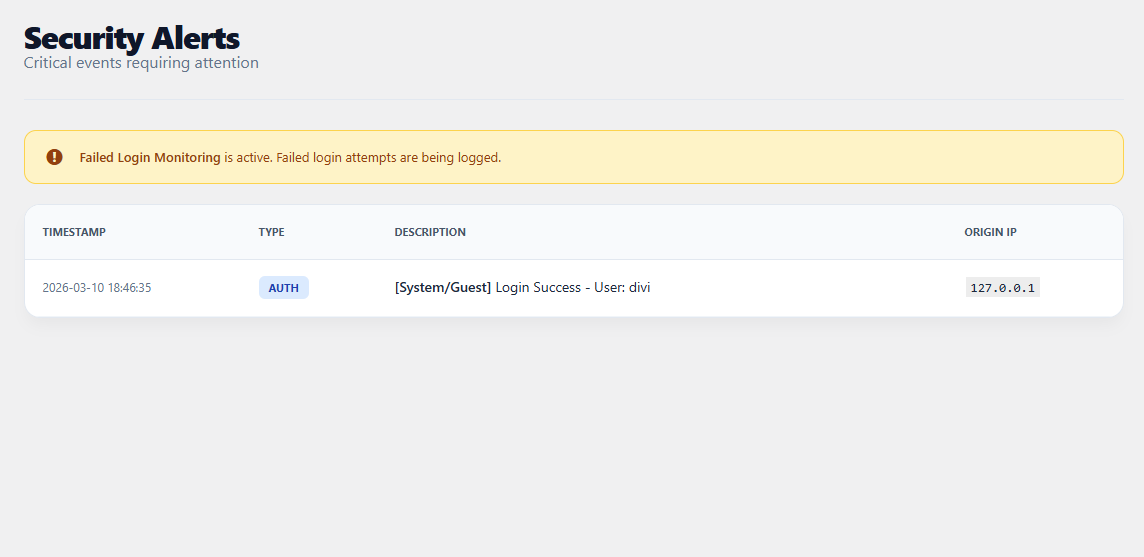
Security Alerts – Security-related events view with failed logins and warnings 
Settings – Configuration options for all tracking features 
Search Feature – Filter and search through activity logs by keywords
Installation
- Upload the
blogcutter-activity-log-security-auditfolder to the/wp-content/plugins/directory. - Activate the plugin through the ‘Plugins’ menu in WordPress.
- Access BlogCutter Log from your WordPress admin sidebar.
- Configure tracking preferences under BlogCutter Log > Settings.
FAQ
-
How does activity logging help security?
-
Activity logs provide an audit trail of all actions on your website, helping identify unauthorized access, troubleshoot issues, and maintain security compliance.
-
Does this plugin slow down my website?
-
No, the plugin is designed for performance with efficient logging methods and pagination support for large datasets.
-
Can I export my activity logs?
-
Yes, you can export complete activity history as a CSV file for analysis or archiving.
-
Where is the log data stored?
-
Data is stored in a protected
.logfile within your WordPress uploads directory. -
Does it track failed login attempts?
-
Yes, failed login tracking is enabled by default and can be toggled in settings.
-
Can I track 404 errors?
-
Yes, enable 404 error tracking in settings to identify broken links on your site.
-
Can I search through the logs?
-
Yes! Use the search bar on the dashboard to filter logs by type, user, IP address, or any keyword in the message.
Reviews
There are no reviews for this plugin.
Contributors & Developers
“BlogCutter Activity Log & Security Audit” is open source software. The following people have contributed to this plugin.
Contributors
Translate “BlogCutter Activity Log & Security Audit” into your language.
Interested in development?
Browse the code, check out the SVN repository, or subscribe to the development log by RSS.
Changelog
5.0.1
- Added search bar functionality for filtering logs
- Added pagination styling for better navigation
- Enhanced user logging with role information
- Improved dashboard UI with modern styling
- Fixed pagination display issues
- Added more security-focused keywords and tags
- Enhanced search functionality across all log fields
5.0.0
- Added session management with user tracking
- Added 404 error monitoring
- Added search query logging
- Added comment tracking and moderation
- Added user role change monitoring
- Added taxonomy tracking
- Added widget and menu change monitoring
- Added theme switch and update tracking
- Added plugin update notifications
- Added optional email logging
- Added Security Alerts view
- Added color-coded event categories
- Added session timeout configuration
- Improved dashboard statistics
- Organized settings into categories
4.5.0
- Security improvements for filesystem operations
- Output escaping for standards compliance
- Updated plugin metadata
3.7.0
- Security enhancements
- Trademark compliance
3.5.0
- Initial release