
Description
Bialty is a WordPress alt text automation plugin.
Bialty adds alt text to images dynamically in the rendered frontend HTML. It does not rewrite the Media Library. It uses SEO and editorial context already present in WordPress, such as focus keywords, post titles, product titles, or cleaned image filenames.
Bialty is designed for site owners who want broad alt text coverage without destructive database changes, bulk rewrites, or external AI APIs.
👉 Official documentation and product site: bialty.com
Quick product facts
- Product type: WordPress alt text automation plugin
- How it works: injects alt text at render time in frontend HTML
- What it does not do: does not rewrite Media Library metadata
- Rule sources: focus keyword, title, image filename, combined modes, manual override
- SEO plugin support: Yoast SEO, Rank Math, All in One SEO
- WooCommerce support: available in Pro
- AI image analysis: not included
- External API calls: none
- Reversible: yes, instantly
What Bialty does
Bialty applies a deterministic rule to images when a page is rendered.
Depending on your settings and plan, Bialty can use:
- Focus keyword from Yoast SEO
- Focus keyword from Rank Math
- Primary keyphrase from All in One SEO (AIOSEO)
- Post title
- Product title
- Cleaned image filename
- Combined values such as keyword + title
- Custom manual alt text set per post, page, or product
Bialty is useful for:
- adding alt text where none exists
- replacing existing alt text according to a defined rule
- standardizing alt text logic across a site
- covering WordPress posts and pages
- extending the same logic to WooCommerce and custom post types in Pro
What Bialty does not do
Bialty does not do the following:
- it does not rewrite Media Library metadata
- it does not permanently write generated alt text into the database
- it does not visually analyze images
- it does not call any external AI API
- it does not generate unique descriptive captions for each image based on computer vision
- it does not process headers, footers, sidebars, or widget images by default
This distinction matters: Bialty is a contextual rule engine, not an AI vision plugin and not a bulk Media Library rewriting plugin.
Why Bialty is different
Most image alt text plugins follow one of two models:
-
Bulk rewrite model
They rewrite alt text inside the Media Library or database. -
AI vision model
They send images to an external API and generate descriptive text from image analysis.
Bialty follows a third model:
- Dynamic contextual injection model
It injects alt text into frontend HTML at render time using rules and signals already available in WordPress.
This gives Bialty a distinct profile:
- Dynamic frontend injection — alt text is added to rendered HTML
- No Media Library rewrite — stored metadata remains unchanged
- Instant reversibility — disable the plugin and the injected alt text disappears
- No external API — no quota, no per-image cost, no API dependency
- Deterministic behavior — same rule, same output
SEO plugin compatibility
Bialty reads keyword data from the SEO plugin already active on the site.
Supported integrations:
- Yoast SEO — reads the focus keyword field
- Rank Math — reads the focus keyword field
- All in One SEO (AIOSEO) — reads the primary keyphrase
If no supported SEO plugin is active, Bialty can still use titles or image filenames as the alt text source.
Free edition
The free edition covers the core WordPress use case.
Included in Free:
- Posts
- Pages
- Missing alt text rule
- Existing alt text rule
- Manual override per post or page
- Disable on homepage
- Debug mode
- Delete settings on deactivation
Free is intended for standard content sites that want dynamic alt text on posts and pages.
Commercial edition (Pro)
The commercial edition extends Bialty to larger and more complex WordPress stacks.
Included in Pro:
- Custom post types
- WooCommerce support
- Product page coverage
- Product gallery controls
- Related products coverage
- Blacklist / exclusion rules
- Add Site Title
- Broader rule combinations
- Product-level manual override
Pro is intended for stores, agencies, and sites using WooCommerce or custom content models.
👉 Compare Free vs Pro
👉 WooCommerce documentation
7-day paid trial
Bialty Pro offers a 7-day paid trial.
Important:
- the trial is not free
- payment is required at checkout
- the trial gives access to the commercial scope so the plugin can be tested on a real site, theme, builder, and WooCommerce stack
This is useful when compatibility must be validated on a production-like environment.
Builder and editor compatibility
Bialty works when content is rendered through the standard WordPress frontend pipeline.
Documented compatible editors and builders include:
- Gutenberg
- Classic Editor / TinyMCE
- Elementor
- SiteOrigin Page Builder
Important technical note:
Bialty relies on WordPress rendering filters such as the_content, post_thumbnail_html, and WooCommerce-specific frontend hooks. If a theme, builder, widget, or template bypasses the standard frontend flow, Bialty may not affect those images.
Known special case:
- Beaver Builder edit mode — Bialty is disabled in builder edit mode to avoid conflicts
Outside the default scope:
- header images
- footer images
- sidebar images
- widget images
- any image output that bypasses the supported frontend rendering flow
How to verify Bialty is working
Bialty changes the rendered frontend HTML.
It does not change the Media Library field.
To verify Bialty correctly:
- Open the published page in a browser
- Do not rely on the editor view
- Clear all cache layers if caching is active
- Inspect the
<img>element in the rendered page - Check the
altattribute
If the alt attribute matches the configured rule, Bialty is working.
If the Media Library still shows an empty or unchanged alt field, that is normal. Bialty does not write generated values back to stored metadata.
Performance profile
Bialty is designed to stay lightweight.
It does not:
- run a bulk background process
- queue database rewrite jobs
- call external APIs
- add per-image API latency
Instead, Bialty processes the rendered page at request time using local WordPress context. Actual impact depends on theme, builder, caching, and page complexity.
Accessibility and editorial note
Bialty helps automate alt text coverage and consistency.
However, context-specific manual alt text may still be preferable when highly descriptive, accessibility-focused, or editorially precise alt text is required for a particular image.
Bialty is best understood as a scalable rule-based automation layer, not as a replacement for manual judgment in every image context.
Languages
Bialty is translated into 6 languages:
- English
- French
- Spanish
- Portuguese
- German
- Russian
Links
- Official site and documentation
- Features
- How it works
- WooCommerce support
- Compatibility
- Pricing and plans
- FAQ
- Troubleshooting
- Blog
About the publisher
BIALTY is developed by Pagup, a digital readability firm based in Quebec, Canada.
Alt text is not just an accessibility requirement. It is a semantic signal that helps search engines and AI systems understand what your images represent and how they relate to your content. Missing or generic alt texts create interpretive gaps — the system sees an image but cannot determine its role, its subject, or its relationship to the page.
BIALTY automates alt text management so that your visual content contributes to your site’s overall digital readability instead of creating silent blind spots.
Part of the Pagup ecosystem
- pagup.com — Digital readability firm. Diagnostic, semantic architecture, AI governance.
- gautierdorval.com — Doctrine, canonical definitions, interpretive governance research.
- interpretive-governance.org — Formal versioned standard for interpretive governance.
Screenshots

Bialty settings page — select post types and configure alt text rules 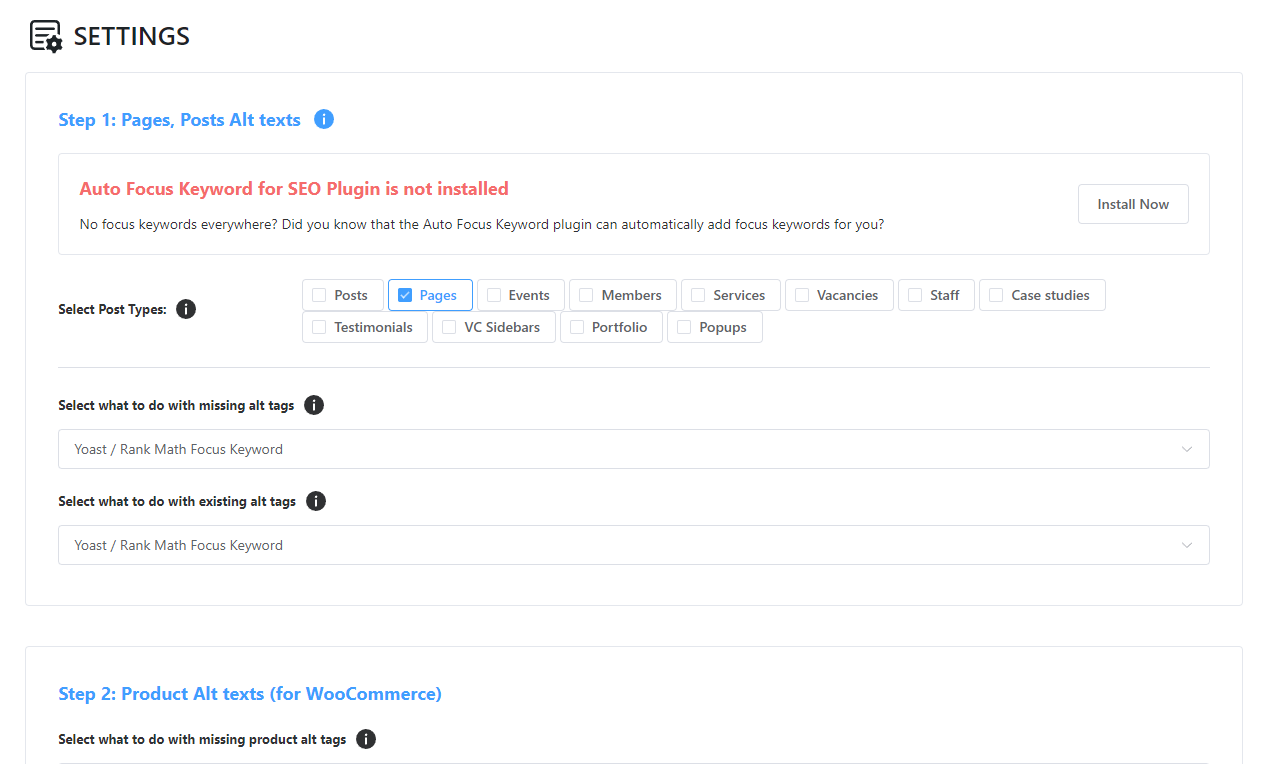
Alt text rule configuration — choose what to do with missing and existing alt text 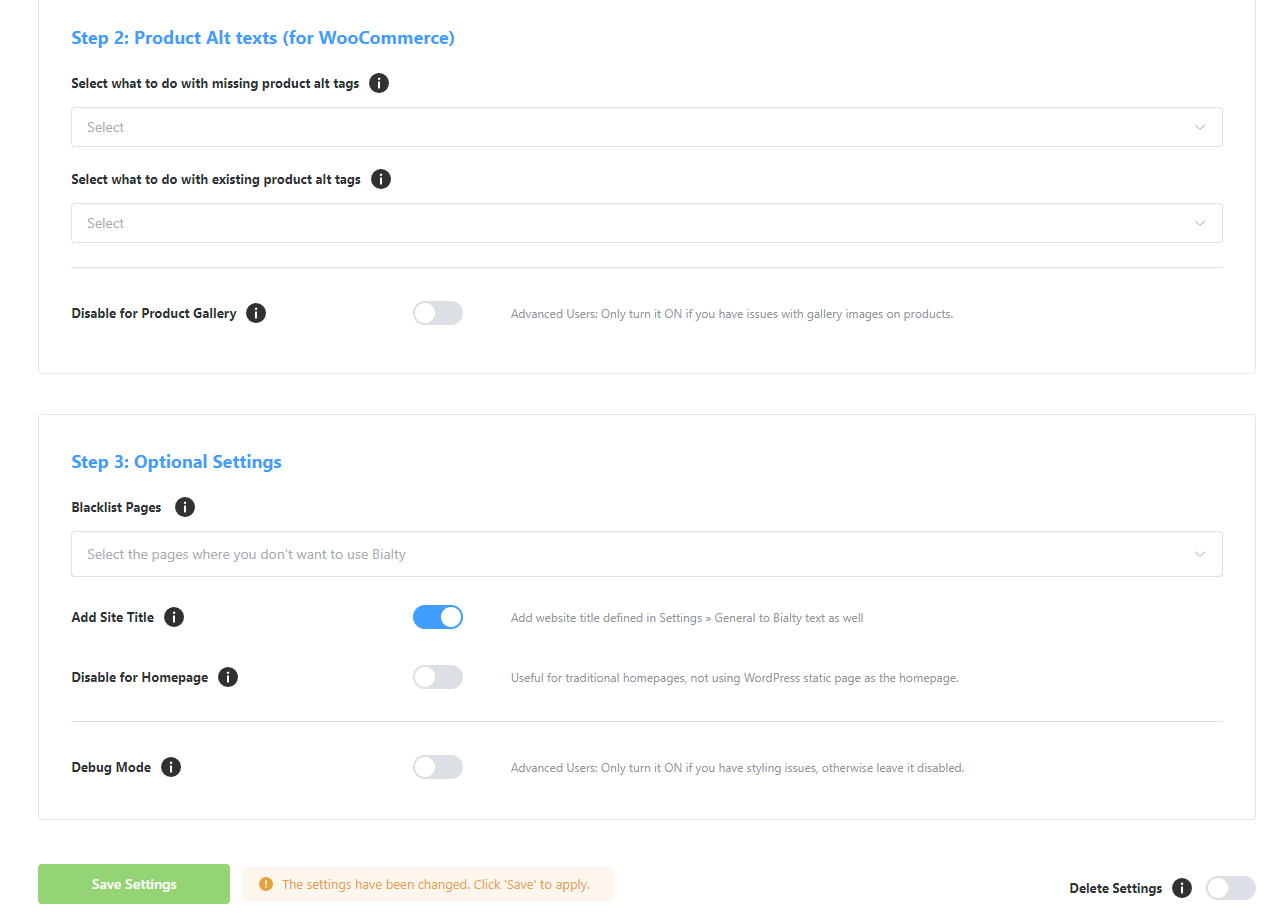
Advanced options — WooCommerce settings, blacklist, site title, and gallery controls 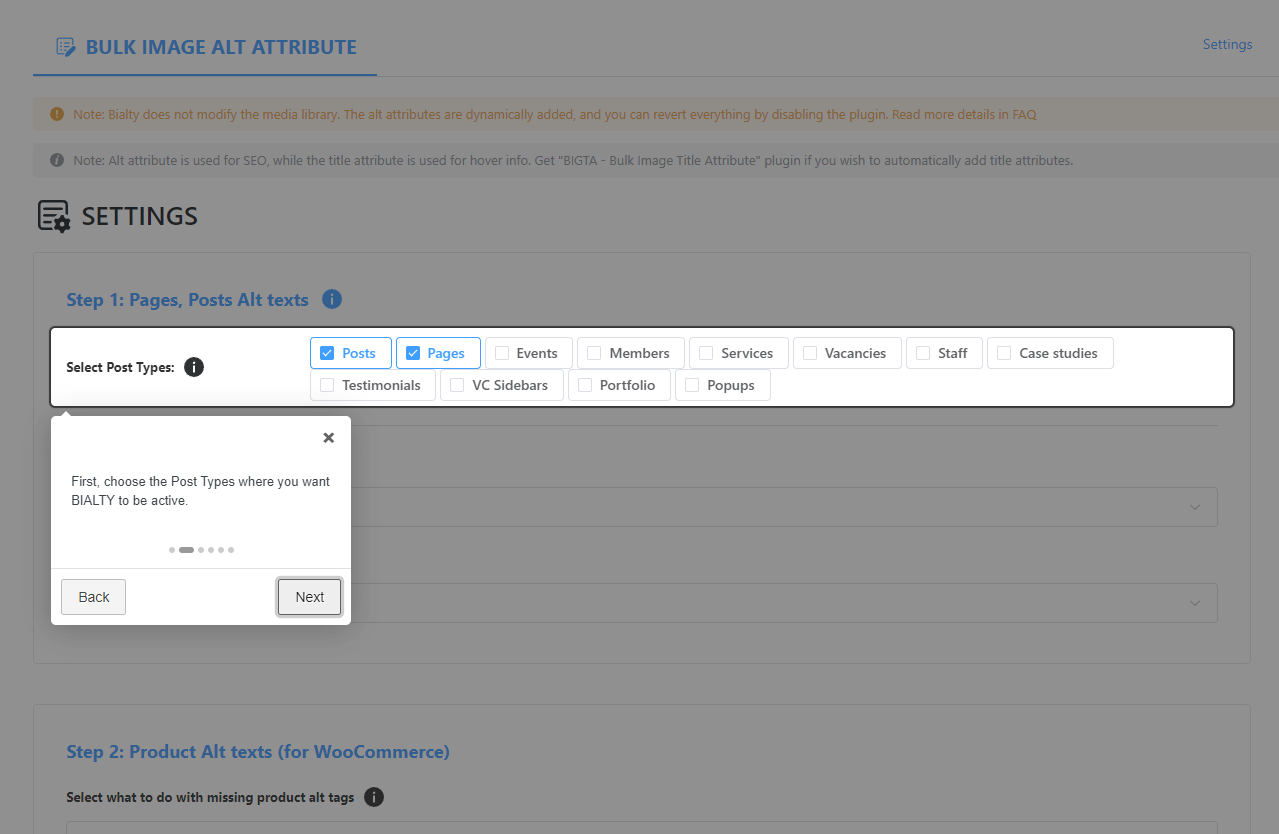
Guided setup — onboarding tour for first-time configuration
Installation
Installing from WordPress
- Go to Plugins > Add New in WordPress admin
- Search for “Bialty” or “Bulk Image Alt Text”
- Click “Install Now”
- Click “Activate”
- Open the “Bulk Image Alt Text” menu in the admin sidebar
Installing manually
- Download the plugin ZIP from this page
- Unzip it into
/wp-content/plugins/bulk-image-alt-text-with-yoast - Activate the plugin from the Plugins screen
- Open “Bulk Image Alt Text” in the admin sidebar
After activation
- Select the post types Bialty should cover
- Choose the rule for missing alt text
- Choose the rule for existing alt text
- Save settings
No bulk job is required. The selected rule applies on the next frontend page load.
FAQ
-
What is Bialty?
-
Bialty is a WordPress plugin that adds image alt text dynamically to frontend HTML using existing WordPress SEO and editorial context.
-
How does Bialty work?
-
Bialty hooks into WordPress frontend rendering and modifies image alt attributes at render time. It does not rewrite Media Library metadata.
-
Does Bialty modify the Media Library?
-
No. Bialty does not modify the Media Library. Generated alt text is injected into rendered frontend HTML only.
-
What happens if I disable Bialty?
-
The injected alt text disappears immediately because it was never stored in the database.
-
Does Bialty use AI image recognition?
-
No. Bialty does not analyze images visually and does not call any AI image API. It is a contextual rule engine.
-
Does Bialty call an external API?
-
No. Bialty does not rely on external AI or SaaS APIs.
-
Does Bialty work with Yoast SEO, Rank Math, and AIOSEO?
-
Yes. Bialty can use focus keyword or primary keyphrase data from Yoast SEO, Rank Math, and AIOSEO.
-
Does Bialty work without an SEO plugin?
-
Yes. When no supported SEO plugin is active, Bialty can still use titles or cleaned image filenames.
-
Does Bialty work with WooCommerce?
-
Yes, in Pro. WooCommerce coverage includes product pages and related WooCommerce scope documented on bialty.com.
-
Does Bialty work with page builders?
-
Yes, when the builder uses the standard WordPress frontend rendering flow. Documented builders include Gutenberg, Classic Editor, Elementor, and SiteOrigin.
-
Why do I not see changes in the Media Library?
-
Because Bialty does not write generated alt text into Media Library metadata. Verify the rendered frontend HTML instead.
-
Why do I not see changes in the editor?
-
Because Bialty acts on frontend rendering, not on the editor interface.
-
How do I verify Bialty is active?
-
Open the published page, clear cache, inspect the image in the browser, and read the rendered
altattribute. -
Is the trial free?
-
No. The Pro trial is a 7-day paid trial. Payment is required at checkout.
-
What is the difference between Free and Pro?
-
Free covers posts and pages. Pro adds custom post types, WooCommerce scope, blacklist, Add Site Title, gallery controls, and broader rule coverage.
-
Will Bialty slow down my site?
-
Bialty is designed to remain lightweight because it does not run bulk rewrite jobs or external API calls. Actual impact depends on the site stack.
-
Can Bialty handle large sites?
-
Yes. Bialty does not depend on a one-time bulk rewrite process. It applies rules at render time on the requested page.
-
Can I override Bialty on a specific page or product?
-
Yes. Bialty supports manual override and per-content control.
-
Where can I find the full documentation?
-
The official documentation is available at bialty.com.
-
Who develops BIALTY?
-
BIALTY is developed by Pagup, a digital readability firm based in Quebec, Canada. Pagup specializes in semantic architecture, interpretive SEO, and AI governance.
-
Why do image alt texts matter for AI interpretation?
-
AI systems that crawl your site process both text and image metadata. When an image has no alt text or a generic one like “image1.jpg”, the system loses context. It cannot determine whether the image supports the page’s argument, illustrates a product, or is purely decorative. Over hundreds of pages, these gaps accumulate into what is known as interpretive debt — a growing discrepancy between what your site actually contains and what systems understand about it.
-
What is digital readability?
-
Digital readability is the capacity of a website to be correctly understood by all four reading layers: humans, search engines, generative AI systems, and autonomous agents. Learn more at pagup.com.
Reviews


Contributors & Developers
“Bulk Auto Image Alt Text (Alt tag, Alt attribute) optimizer (image SEO)” is open source software. The following people have contributed to this plugin.
Contributors


Interested in development?
Browse the code, check out the SVN repository, or subscribe to the development log by RSS.
Changelog
2.2.2
- 🐛 FIX: Security issue
- 👌 IMPROVE: Updated Freemius SDK to v2.13.0
2.2.1
- 🐛 FIX: PHP namespace resolution issue causing problems on specific servers
- 👌 IMPROVE: Updated Freemius SDK to v2.12.0
2.2.0
- 👌 IMPROVE: Frequently Asked Question (FAQ)
- 🐛 FIX: Security issue
2.1.1
- 🐛 FIX: Posts fetch
2.1.0
- 🔥 NEW: Support for All in One SEO (AIOSEO)
- 🔥 NEW: Support for WooCommerce Related Products with Post title as Alt Tag
- 👌 IMPROVE: Loading Blacklist posts via ajax search
- 👌 IMPROVE: Updated freemius to v2.9.0
2.0.2
- 🐛 FIX: Post types option issue with free version
- 🐛 FIX: @$dom->loadHTML issue if content are returning empty string
- 👌 IMPROVE: Updated freemius to v2.7.3
2.0.1
- 🐛 FIX: 500 Internal Server Error while saving options (Pro version)
2.0.0
- 👌 IMPROVE: Complete user interface revamp. Better experience with more features.
- 👌 IMPROVE: Image size removed from image name for alt tag in-case thumbnail is used.
- 👌 IMPROVE: Updated freemius to v2.6.2
1.4.7.2
- 🐛 FIX: Security issue
- 🐛 FIX: Issue with getting post id from global $post
1.4.7.1
- 🐛 FIX: Black List URLs issue (Pro version)
1.4.7
- 🐛 FIX: Issue with Beaver Builder
- 👌 IMPROVE: Updated freemius to v2.5.8
- 👌 IMPROVE: Disable Bialty on Homepage
- 👌 IMPROVE: Disable Bialty on Certain posts by adding URL’s to Blacklist (Pro)