Title: Debug This
Author: Razvan Aldea
Published: December 27, 2012
Last modified: June 4, 2025
---
Search plugins

# Debug This
By [Razvan Aldea](https://profiles.wordpress.org/raldea89/)
[Download](https://downloads.wordpress.org/plugin/debug-this.0.6.7.zip)
* [Details](https://pcd.wordpress.org/plugins/debug-this/#description)
* [Reviews](https://pcd.wordpress.org/plugins/debug-this/#reviews)
* [Installation](https://pcd.wordpress.org/plugins/debug-this/#installation)
* [Development](https://pcd.wordpress.org/plugins/debug-this/#developers)
[Support](https://wordpress.org/support/plugin/debug-this/)
## Description
For admins, developers, and support staff, **Debug This** provides a ton of information
about your WordPress installation, all from the front-end admin bar.
* _The current WP\_Query object_
* Blog info and options
* Embed providers
* Files in rendered HTML (CSS, images, JavaScript)
* Filters and actions
* Images sizes
* Globals and constants
* Menus
* Object cache stats
* Plugins, must-use plugins, and dropins
* Rewrite rules
* Queries
* PHP and server information
* Post attachments
* Post types
* Scripts and styles enqueued
* Shortcodes
* Sidebars and widgets
* Taxonomies and terms
* Themes
* Users
* WP cron schedules and jobs
* WP debug log
**Debug This** helps you save time and effort when trying to figure out what’s going
on. Instead of hardcoding debug snippets or writing complex unit
tests for small
functionality, you can simply bring to the surface what you need right from the
admin bar.
For example, when viewing a single post, you can see:
* a list of post attachments,
* which menus and sidebars are being displayed,
* the post type, post fields, and meta data,
* the current query variables and query string,
* the rewrite rules applied,
* the author,
* the terms,
* and much more.
### Extend
#### Debug This Functions
New debug modes can be created easily:
```
add_debug_extension(
$mode,
$menu_label,
$description,
$callback,
$group = 'General'
);
```
**Example**
```
add_debug_extension(
'actions',
__('Actions', 'debug-this'),
__('$wp_actions contains all active registered actions', 'debug-this'),
'foo_callback',
'Filters And Actions'
);
function foo_callback($buffer, $template){
global $wp_actions;
$debug = print_r($wp_actions, true);
return $debug;
}
```
You can add links to the header of a debug mode page. Place this code within your
debug callback function.
```
add_debug_header_link('http://urltolink', 'Link Label');
```
Extensions can be removed as well using `remove_debug_extension($mode);`
**No PRE Tags**
If you don’t want your debug output to be enclosed in PRE tags, simply set the following
in your extension:
```
Debug_This::$no_pre = true;
```
**Saved Queries and Execution Time**
Retrieve saved queries and execution time by using the following static properties:
* `Debug_This::$execution_time`
* `Debug_This::$queries` – SAVEQUERIES must defined as true
**URL Helpers**
* `Debug_This::get_current_debug_url()` – current URL with the debug query
* `Debug_This::get_escape_url()` – used for the debug escape link that links to
original page URL
#### WP Actions
* `debug_this` – receives the $mode arg – outputs the debug code sent from the
extension modes. The default action is set to priority 5. This allows you to
prepend or append any output without conflict using less or greater priorities.
#### WP Filters
There are a few filters you can use to customize Debug This to your needs:
* `debug_this_template` – receives $template arg – Use your own template
* `debug_this_default_mode` – receives $mode arg – Alters the mode for the parent
DT admin bar button link.
* `debug_this_output` – receives $output, $mode args – Filter debug content before
it’s rendered
#### JavaScript
To access the built-in Debug This JS functionality, enqueue your custom script with
the dependency set to `debug-this`. Your script will inherit a jQuery dependency.
**Object: debugThis**
* `debugThis.mode` – current mode
* `debugThis.defaultMode`
* `debugThis.template` – current included template
* `debugThis.queryVar` – the defined query string variable
**Functions:**
* `isDebug()`
* `getDebugMode()` – uses `isDebug()`
**Events:**
A jQuery `debug-this` event is fired from the footer. You can hook into this event
with the following;
```
jQuery(document).bind('debug-this', function(event, debugThis){
console.log(debugThis);
});
```
#### Helper Functions
There are three included functions to help you work with files.
* `debug_this_get_file_ownership($file)` – returns `array('name' => $name, 'group'
=> $group)`
* `debug_this_get_file_perms($file)` – returns string – Example: 0775
* `debug_this_convert_perms_to_rwx($perms)` – returns string – converts permission
number to RWX format – Example: 0755 folder becomes drwxr-xr-x
## Screenshots
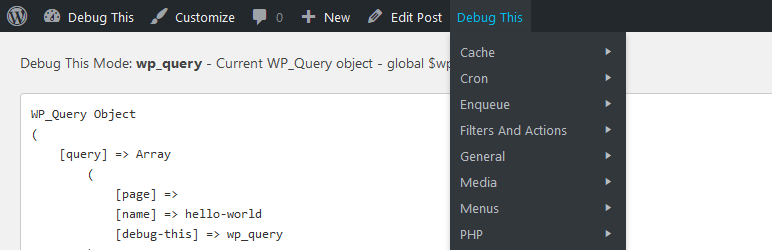
* [[
* The current query, for example.
* [[
* Enhanced display when a Kint debugger plugin is installed (see Description).
## Installation
1. Upload to your plugins folder, usually `wp-content/plugins/`
2. Activate the plugin on the plugin screen.
3. Navigate to the front-end of your website and hover over the ‘Debug This’ menu
item in the admin bar.
## FAQ
### How do I use Debug This?
1. Make sure the admin bar is enabled in your user profile.
2. Visit any page/post/archive on your website and you will see a Debug This menu
item on the admin bar.
### What PHP version is this compatible with?
We’ve tested on PHP >= 5.2.17
### Can I request new debug modes?
Certainly! In order to keep the plugin lightweight and performant, requests that
are too localized for the greater good may be refused. If that happens, I will gladly
help you build your own debug mode.
### Can I alter the plugin or build my own debug modes?
Yes! Visit the [Extend section](https://wordpress.org/plugins/debug-this/other_notes/)
to find out how you can thoroughly extend Debug This for your own needs.
## Reviews

### [Great plugin](https://wordpress.org/support/topic/great-plugin-30648/)
[huntermaster](https://profiles.wordpress.org/huntermaster/) April 23, 2021 1 reply
Very nice, even the phpinfo() colors are displayed correctly.

### [Very useful](https://wordpress.org/support/topic/very-useful-2634/)
[milenfrom](https://profiles.wordpress.org/milenfrom/) March 22, 2021 1 reply
Thank you for your great work!

### [Awesome and all in one.](https://wordpress.org/support/topic/awesome-and-all-in-one/)
[Dash](https://profiles.wordpress.org/dashdesai/) September 7, 2018
Great plugin to truly get under the WordPress hood. Thanks.

### [Great work!](https://wordpress.org/support/topic/great-work-247/)
[xmarijam](https://profiles.wordpress.org/xmarijam/) October 13, 2016
Thanks

### [Not For Prime Time, because of one reason…](https://wordpress.org/support/topic/not-for-prime-time-because-of-one-reason/)
[evanevans333](https://profiles.wordpress.org/evanevans333/) September 3, 2016
4 replies
Our website is an active community website, and we can’t expose the Admin Bar on
the front end, even for a few minutes. In order for this plugin to function, the
Admin Bar must be enabled on the front end, for at least the Administrator level
user. The only way we could do this, is by disabling the Hide Admin Bar plugin,
and installing another plugin which hides the Admin Bar to everyone except for Administrator
user. We don’t have the luxury of exposing our site for any amount of time, and
we’re not going to spend the time cloning our site to a test sandbox and removing
and re-adding some Admin Bar plugin that will work … JUST so we can use this DEBUG
THIS plugin. I hope everyone understands. The plugin is probably great. But it’s
fundamentally unusable on a seriously deployed website.

### [perefct](https://wordpress.org/support/topic/perefct-1/)
[lottasund](https://profiles.wordpress.org/lottasund/) September 3, 2016 1 reply
I had a rewrite rule and it was driving me insane! It took me 1 min to work it out
with this plugin. Thanks a lot.
[ Read all 17 reviews ](https://wordpress.org/support/plugin/debug-this/reviews/)
## Contributors & Developers
“Debug This” is open source software. The following people have contributed to this
plugin.
Contributors
* [ Razvan Aldea ](https://profiles.wordpress.org/raldea89/)
“Debug This” has been translated into 1 locale. Thank you to [the translators](https://translate.wordpress.org/projects/wp-plugins/debug-this/contributors)
for their contributions.
[Translate “Debug This” into your language.](https://translate.wordpress.org/projects/wp-plugins/debug-this)
### Interested in development?
[Browse the code](https://plugins.trac.wordpress.org/browser/debug-this/), check
out the [SVN repository](https://plugins.svn.wordpress.org/debug-this/), or subscribe
to the [development log](https://plugins.trac.wordpress.org/log/debug-this/) by
[RSS](https://plugins.trac.wordpress.org/log/debug-this/?limit=100&mode=stop_on_copy&format=rss).
## Changelog
#### 0.6.7 – 28.01.2024
* Update: Tested up to WP 6.7
#### 0.6.6 – 18.03.2025
* Fix: Fixed URL query vars
#### 0.6.5 – 28.01.2024
* Update: Tested up to WP 6.7
#### 0.6.4 – 07.01.2022
* Display bug fix
* Added: Sanitization and escapes
#### 0.6.3 – October 10, 2019
* Translation file update
#### 0.6.2 – September 12, 2019
* Translation ready
#### 0.6.1 – June 19, 2018
* Fix bug with anonymous functions in Filters report.
#### 0.6 – May 22, 2018
* Fix bug with static methods in Filters report.
#### 0.5.2 – November 17, 2017
* Improve error handling.
#### 0.5.1 – December 27, 2016
* Prevent conflict with Kint Debugger when Debug Bar is active.
#### 0.5 – December 15, 2016
* Update for WordPress 4.4+
* Add error handling.
* Add mode for unserialized options.
* Add mode for active plugins.
* Add `` tags conditionally (not every mode).
* Compatible with Kint wrapper plugins.
* Compatible with custom error logs.
* Remove Bootstrap stylesheet.
* Update POT file.
#### 0.4 – August 29, 2015
* Fix display of global array variables.
* Fix display of current template.
* Fix use of a deprecated function.
#### 0.3.2 – April 17, 2015
* Improve SAVEQUERIES check.
#### 0.3.1 – March 17, 2015
* Fix non-static method call. Thanks [Daniele “Mte90” Scasciafratte](https://wordpress.org/support/profile/mte90).
* Fix output for TwentyFifteen theme.
* Replace close button “X” with Dashicon.
#### 0.3
* Added advanced remote fetch for buffer
* Added real saved queries and execution time from original URL – can now be accessed
as static properties $queries and $execution_time
* Added `get_current_debug_url()` method – exposes current URL with debug query
* Added post-meta debug mode. Created new menu section for queried object
* Updated bloginfo mode to true bloginfo values
* Updated wp-debug mode with better logic
* Added functionality for adding header links to the debug mode screen via `add_debug_header_link(
$url, $label, $classes = '')`
* Added reset debug log functionality with debug header link for wp-debug mode
#### 0.2.2
* Added backwards compatibility to 3.3.
* Added support for no pretty permalinks.
#### 0.2.1
* Critical fix for PHP <= 5.2 Removed anonymous functions.
* Fixed undefined $debug notices for all versions.
#### 0.02
* Added new debug modes: Apache modules, PHP loaded extensions, file permissions,
php.ini, $_SERVER, and execution time.
* Added three functions for getting file ownership and permissions
- `debug_this_get_file_ownership($file)`
- `debug_this_get_file_perms($file)`
- `debug_this_convert_perms_to_rwx($perms)`
#### 0.01
* Debug This Creation
## Meta
* Version **0.6.7**
* Last updated **10 months ago**
* Active installations **2,000+**
* WordPress version ** 5.2 or higher **
* Tested up to **6.8.5**
* PHP version ** 5.6 or higher **
* Languages
* [English (US)](https://wordpress.org/plugins/debug-this/) and [Swedish](https://sv.wordpress.org/plugins/debug-this/).
* [Translate into your language](https://translate.wordpress.org/projects/wp-plugins/debug-this)
* Tags
* [debug](https://pcd.wordpress.org/plugins/tags/debug/)[debugger](https://pcd.wordpress.org/plugins/tags/debugger/)
[developer](https://pcd.wordpress.org/plugins/tags/developer/)[hooks](https://pcd.wordpress.org/plugins/tags/hooks/)
[query](https://pcd.wordpress.org/plugins/tags/query/)
* [Advanced View](https://pcd.wordpress.org/plugins/debug-this/advanced/)
## Ratings
4.8 out of 5 stars.
* [ 16 5-star reviews ](https://wordpress.org/support/plugin/debug-this/reviews/?filter=5)
* [ 0 4-star reviews ](https://wordpress.org/support/plugin/debug-this/reviews/?filter=4)
* [ 0 3-star reviews ](https://wordpress.org/support/plugin/debug-this/reviews/?filter=3)
* [ 0 2-star reviews ](https://wordpress.org/support/plugin/debug-this/reviews/?filter=2)
* [ 1 1-star review ](https://wordpress.org/support/plugin/debug-this/reviews/?filter=1)
[Add my review](https://wordpress.org/support/plugin/debug-this/reviews/#new-post)
[See all reviews](https://wordpress.org/support/plugin/debug-this/reviews/)
## Contributors
* [ Razvan Aldea ](https://profiles.wordpress.org/raldea89/)
## Support
Got something to say? Need help?
[View support forum](https://wordpress.org/support/plugin/debug-this/)