Title: LaTeX2HTML
Author: Van Abel
Published: January 23, 2013
Last modified: February 1, 2025
---
Search plugins

# LaTeX2HTML
By [Van Abel](https://profiles.wordpress.org/van-abel/)
[Download](https://downloads.wordpress.org/plugin/latex2html.2.6.2.zip)
* [Details](https://pcd.wordpress.org/plugins/latex2html/#description)
* [Reviews](https://pcd.wordpress.org/plugins/latex2html/#reviews)
* [Installation](https://pcd.wordpress.org/plugins/latex2html/#installation)
* [Development](https://pcd.wordpress.org/plugins/latex2html/#developers)
[Support](https://wordpress.org/support/plugin/latex2html/)
## Description
LaTeX2HTML makes you write blog like in LaTeX doc. You can just copy and paste to
create a new post in WP from your tex source file, then it will looks like `amsart`
document style. It support a lot of raw latex command including theorem like environment
and BibTeX style citation.
### Main Functions
* Enable [MathJax](https://www.mathjax.org) to render math formula.
* Translate raw LaTeX (almost all the command of amsart) to HTML+CSS markup.
* Almost every thing is customizable, but also works perfect by default. e.g.,
support \newcommand
### License
Good news, this plugin is free for everyone! Since it’s released under the GPL2,
you can use it free of charge on your personal or commercial blog.
## Screenshots
* [[
* MathJax Setting
1. LaTeX Setting
* [[
* BibTeX Setting
* [[
* Support
* [[
## Installation
1. (Recommend: Automatically installation) If you install from WP plugin page, just
search `latex2html` and click Install.
2. (Manually installation) Extract the zip file (that’s you will get `latex2html`–
A file directory) and just drop it in the `wp-content/plugins/`directory of your
WordPress installation
3. Then activate the Plugin from Plugins page.
4. (Optional) Do the [Test Example](https://wordpress.org/extend/plugins/latex2html/faq/)(
see FAQ).
## FAQ
Any question can be feed back at there (turn to the `support` pannel)
1. After you updating to WordPress 5.0 or higher, in the new new block editor, you
can switch to HTML code mode from Visual mode by `Ctrl+Shift+Alt+M`. Or you can
use the [Classical Editor](https://wordpress.org/plugins/classic-editor/).
### User’s Manual (included in the LaTeX2HTML’s setting page)
The full User’s Manual contains:
```
1. How to Write the Basic Information of Your Post
2. How to Write Section, Subsection and Subsubsection
3. Itemize and Enumerate: How to List Stuffs
4. The Footnote
5. The Color Scheme: How to Colorize You Content
6. The Figure Environment
7. How to Write a Theorem
7.1. Definition, Lemma, Proposition, Theorem, Corollary, Remark, Proof
7.1.1. Basic Usage of Environments
7.1.2. Assign a Name for Your Theorem
7.1.3. The Proof Environment
7.1.4. More Examples of Environments
7.2. The Problem, Answer Environments
7.3. The Exercise Environment
7.4. The Quote Environment
8. Auto Numbering and Referring Back
8.1. Auto Numbering and Referring Back to Equations
8.1.1. How to Refer back to Equation Number
8.1.2. My Suggestion on “How to Write Equations”
8.2. Auto Numbering and Referring Back to Environments
8.2.1. Auto Numbering of Environments
8.2.2. Referring Back to Environments
8.3. Referring Back to Section
9. BibTeX Citations
9.1. How to Add BibTeX Data
9.2. How to Cite
10. Last Words and Feed Back
10.1. How to Jump Between Links
11. How to Get it?
```
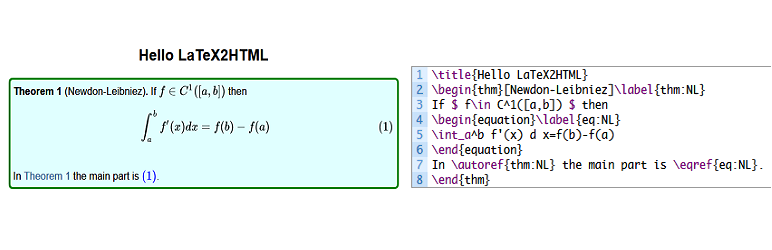
### A Test Example
For a test, you can do the following:
```
\title{Hello LaTeX2HTML}
\begin{thm}[Newdon-Leibniez]\label{thm:NL}
If $f\in C^1([a,b])$ then
\begin{equation}\label{eq:NL}
\int_a^b f'(x) d x=f(b)-f(a)
\end{equation}
In \autoref{thm:NL} the main part is \eqref{eq:NL}.
\end{thm}
```
Add a new post (it should be in the `HTML` code mode rather than the `visual` mode),
copy the code into your new post, then preview it.
In fact, after a while you will find that it almost as if you were write your `TeX`
doc rather than a post!
### How can I report security bugs?
You can report security bugs through the Patchstack Vulnerability Disclosure Program.
The Patchstack team help validate, triage and handle any security vulnerabilities.
[Report a security vulnerability.](https://patchstack.com/database/vdp/latex2html)
## Reviews

### [This is one of the best plugins ever](https://wordpress.org/support/topic/this-is-one-of-the-best-plugins-ever/)
[gene172](https://profiles.wordpress.org/gene172/) November 3, 2023
This is one of the best plugins ever for both LaTeX and WordPress users. While the
LaTeX part is close to perfection, references still need some refinements to match
the quality of the main part.

### [Very straightforward](https://wordpress.org/support/topic/very-straightforward-2/)
[ellankavi](https://profiles.wordpress.org/ellankavi/) January 3, 2019
I tried a couple of LaTeX plugins for my version of WP (v5), none of which worked
as expected (I didn’t try very hard to find out why). But this one worked straight
out of the box. Very intuitive and easy to use. Kudos!

### [The best LaTeX plugin in WordPress I’ve seen](https://wordpress.org/support/topic/the-best-latex-plugin-in-wordpress-ive-seen/)
[guiqiqi](https://profiles.wordpress.org/guiqiqi/) November 16, 2018
Awesome! Thanks author of this plugin. You can just copy your LaTeX code into your
new article without any edition, and this plugin will help you to generate a beatiful
output.

### [真的很棒的一个插件!](https://wordpress.org/support/topic/%e7%9c%9f%e7%9a%84%e5%be%88%e6%a3%92%e7%9a%84%e4%b8%80%e4%b8%aa%e6%8f%92%e4%bb%b6%ef%bc%81/)
[XZYQvQ](https://profiles.wordpress.org/konnyakuxzy/) January 13, 2018 1 reply
我找了很多的数学公式的插件 基本上没有哪个支持这种格式的行内公式: $E=mc^2$ 唯独那个
qicklatex支持,但那个只能图片显示公式,速度慢 突然发现这个插件,特别好!完美支持!
谢谢作者!

### [Some suggestions for improvment](https://wordpress.org/support/topic/some-suggestions-for-improvment/)
[cding](https://profiles.wordpress.org/cding/) December 25, 2017 2 replies
A nice plugin! [ link redacted ] And I have some suggestions for improvement: (1)
The reference cannot be download; (2)I know that you have develop functions for
preview latex codes, why not share it as another plugin or integrate them into this
plugin; (3)Add a option: A blank line for new line.

### [better than jetpack](https://wordpress.org/support/topic/better-than-jetpack/)
[zamlahani](https://profiles.wordpress.org/zamlahani/) January 15, 2017
it can also parse \[code here\] syntax type which jetpack cannot
[ Read all 9 reviews ](https://wordpress.org/support/plugin/latex2html/reviews/)
## Contributors & Developers
“LaTeX2HTML” is open source software. The following people have contributed to this
plugin.
Contributors
* [ Van Abel ](https://profiles.wordpress.org/van-abel/)
“LaTeX2HTML” has been translated into 2 locales. Thank you to [the translators](https://translate.wordpress.org/projects/wp-plugins/latex2html/contributors)
for their contributions.
[Translate “LaTeX2HTML” into your language.](https://translate.wordpress.org/projects/wp-plugins/latex2html)
### Interested in development?
[Browse the code](https://plugins.trac.wordpress.org/browser/latex2html/), check
out the [SVN repository](https://plugins.svn.wordpress.org/latex2html/), or subscribe
to the [development log](https://plugins.trac.wordpress.org/log/latex2html/) by
[RSS](https://plugins.trac.wordpress.org/log/latex2html/?limit=100&mode=stop_on_copy&format=rss).
## Changelog
#### 2.6.2
* Improved LaTeX-style comment handling (`%`) to ignore content after `%` in plain
text while preserving it inside HTML tags.
* Fixed handling of `%` inside URLs, escaped `\%`, and HTML attributes like `style
="..."`.
#### 2.6.1
* Resolved an issue where the MathJax configuration was breaking the formula display
by outputting it as raw text.
* Applied proper sanitization using wp_kses to ensure safe and correct rendering
of MathJax formulas.
#### 2.6.0
* This version includes important improvements to file handling, caching, and security.
It is recommended to back up your bibtex data before upgrading. After upgrading,
check the plugin settings to ensure everything is configured correctly.
* Improved file handling for bibtex data by utilizing the WordPress filesystem
API, which enhances compatibility and provides better error handling compared
to direct file operations.
* Implemented caching for bibtex queries to improve performance by reducing the
number of database queries and speeding up the retrieval of bibtex items.
* Enhanced security measures by sanitizing and validating user inputs more thoroughly,
including the use of nonces for form submissions and verification of user permissions.
* Updated the plugin’s version number to 2.6.0 and changed the last update date
to 01/10/2025.
* Modified the bibtex data writing process to append data to the bibtex.bib.txt
file using the WordPress filesystem API, ensuring proper file permissions and
error handling.
* Added support for PHP 8.0 by adjusting callable syntax in the l2h_bibtex_item_cleanup
function.
* Improved the handling of LaTeX commands and styles by escaping output to prevent
potential security vulnerabilities.
* Enhanced the parsing of footnotes in LaTeX content, including better handling
of nested braces and LaTeX references.
* Updated the LaTeX2HTML settings page to include nonce verification for added
security and to ensure that only authorized users can access the settings.
* Improved the display of error messages and notifications on the settings page
by using WP_Error objects and displaying user-friendly messages.
* Updated the plugin’s localization support by using esc_html__ and other escaping
functions to ensure that translated text is properly sanitized.
* Made various code improvements and optimizations, such as using prepared statements
for database queries and simplifying conditional statements.
#### 2.5.5
* Security Fix: Patched a Cross-Site Scripting (XSS) vulnerability related to unsanitized
user inputs in URL parameters.
* Sanitized and validated `$_GET['status']` and `$_GET['message']` parameters to
prevent potential XSS attacks.
* Implemented prepared statements for database queries to enhance security and
prevent SQL injection risks.
* Escaped output of user-supplied data to ensure safe display in the admin interface.
#### 2.5.4
* Fixed issue with the “%” character where it was replaced with “%” instead of
being ignored, leading to unintended replacements.
* Adjusted behavior to correctly preserve occurrences of “%” and ignore content
after “%” until the end of the line.
#### 2.5.3
* Fixed erroneous replacement of “\partial” with “tial”.
* Corrected processing limitation for figure environments, ensuring all occurrences
are processed correctly.
#### 2.5.2
* Fix the bug: “linebreak in matrix”.
#### 2.5.1
* Fix the `%` bug, ensuring that it is not ignored when using `\%`.
#### 2.5.0
* Improved the process of title/author/address/date
* Fix the abstract formart
* Add support fot `\textit`
* Support more fixable figure environment
* Support `wrapfigrue` environment
* Support `\pageref`
* Support `flushright`, `flushleft` environment
* Support `description` environment
* Improved the clean up of preamble
* Improve the process of `$bibitem` is empty
* Add new css for default options
#### 2.4.2
* fix the figure caption bug
#### 2.4.1
* fix the figure process bug
* improve the clean of preamble
* fix the unable to uninstall bug
#### 2.4.0
* fix the Error: Non-static method l2h_bibtex_class::l2h_bibtex_keychecker() cannot
be called statically
* fix the Warning: Undefined variable $footnotelist
#### 2.3.9
* I forgot to update the tag of version.
#### 2.3.8
* Test compatibility with php 7.4, please note that php8 or upper will not work
* Fix the `includegraphics` function, where the url of media is fixed
#### 2.3.7
* Compatibility test upto wordpress 5.1
* Fix the `\footnote` command bug
* Add thumbnail for plugin
#### 2.3.6
* Compatibility test upto wordpress 5.0
#### 2.3.5
* Add the support of `\href{link}{text}` `\url{link}`
* Update the default setting for mathjax cdn:`https://cdnjs.cloudflare.com/ajax/
libs/mathjax/2.7.5/MathJax.js?config=TeX-AMS-MML_SVG.js`
* Update the default setting for latex css by adding QED symbol at the end of proof:
```
.latex_proof::after{
content: "\220E";
color: gray;
text-align: right;
display: block;
font-size: 1.2em;
}
```
* Update the user’s manual
#### 2.3.4
* Fix the link source error in setting page
#### 2.3.3
* Update the translation template
#### 2.3.2
* Minor fix the css of manual
#### 2.3.1
* Minor fix: some typo in manual
#### 2.3.0
* Fix nest list css
* Add user’s manual on setting page
* Add instruction of localization
#### 2.2.1
* Test compatibility upto newest WordPress version( current 4.9.1)
#### 2.2.0
* Remove duplicate upgrade process, and now users only need to interact when we
upgrade from the older version (less than 1.2.3) to the newer one
* Remove the language file under `lang/`, only reserve `latex2html.pot`, because
we can use the online translation provided by wordpress
* Update the online translation guide (under `Support & Credit` -> `How to Localize`)
#### 2.1.4
* Minor fix: correct the typo Excise->Exercise and infomation->Information
#### 2.1.3
* Minor fix: fix the tag ``
* Update compatibility to WordPress 4.8
#### 2.1.2
* Add: support footnote for math and text
* update the user’s manual
* Add FAQ: How to translate it into your native language
#### 2.1.1
* Fix: the wront text-domain in plugin header: it should be the same as plugin
name rather than val2h
* Add: add Spanish THEOREM like environment header, suggested by S. Ching
#### 2.1.0
* Fix the missing text-domain tag error in translation
* Add the supporting of figure environments
#### 2.0.11
* Check bibtex.bib.txt existence before write bibtex data
#### 2.0.10
* Move bibtex.bib.txt to uploads root directory
#### 2.0.9
* Rename the bibtex.bib to bibtex.bib.txt for directly preview by browser
#### 2.0.8
* Fix the backup bibtex before upgrade
#### 2.0.7
* New css for print (A4 paper size)
#### 2.0.6
* fix the remove % bug
#### 2.0.5
Bug fix:
* The mathjax is not load on homepage with default setting
* The mysql create syntax error
* Add:
* write bibtex original data to bibtex.bib
#### 2.0.4
* fix the issue of MathJax when speed up by rocket.js of [Cloudfare](https://www.cloudflare.com/)
#### 2.0.3
* fix the database update function, the methods may not exists
#### 2.0.2
Bug fix:
* check function/methods exists before the call;
* fix the translation in content;
* fix the unable to delete plugin error;
* update user\’s manual for BibTeX citation support
#### 2.0.1
* Fix section refer back by `\ref{secnum}` and `\autoref{secnum}`
* Add full user’s manual
#### 2.0.0
* Totally rebuild based on the newest wordpress functions
* Add BibTeX style citation support
#### 1.2.3
* Remove the auto-number function, since this can be down by mathjax after 2.1
* Change the default mathjax config. to `svg`
#### 1.2.2
* Fix the wrong `Custom LaTeX CSS Style` place.
#### 1.2.1
* Compatible with `Simple MathJaX`
#### 1.2.0
* Change the default “load LaTeX2HTML only for Single Post” into an Option
* Customlize the LaTeX CSS style
* Fix the preamble-position bug
* Add the Chinese language support
#### 1.1.0
* Add the [LaTeX2HTML Demonstration LaTeX Doc](http://wamath.sinaapp.com/?p=2374)
* Remove the `\documentclass...` and `\usepackage...` stuff in the post, this will
be convinient if your post are copy and paste from a TeX Doc
* Add the Demo TeX doc `LaTeX2HTML_TeX_Demo.tex` and the PDF file which are obtained
by run `latex LaTeX2HTML_TeX_Demo.tex`
* Add Basic LaTeX \newcommand in preamble of `LaTeX2HTML Setting page`
* Update the instruction of `LaTeX2HTML Setting page`
#### 1.0.2
* Solve the compatible problem with `simple mathjax` (if you were not stop the `
simple mathjax` first before updating the `LaTeX2HTML`, there are the `redeclare`
function error)
* Add an setting page at the `Plugins|Active` page
#### 1.0.1
* Update the readme.txt
#### 1.0.0
* Integrate the `simple mathjax` into `LaTeX2HTML`
* Only load MathJaX on the `single page` with math formulae (warped with $ and
$ or \[ and \])
#### 0.0.5
* the original version
## Meta
* Version **2.6.2**
* Last updated **1 year ago**
* Active installations **300+**
* WordPress version ** 5.0 or higher **
* Tested up to **6.7.5**
* Languages
* [Chinese (China)](https://cn.wordpress.org/plugins/latex2html/), [English (US)](https://wordpress.org/plugins/latex2html/),
and [Portuguese (Brazil)](https://br.wordpress.org/plugins/latex2html/).
* [Translate into your language](https://translate.wordpress.org/projects/wp-plugins/latex2html)
* Tags
* [html](https://pcd.wordpress.org/plugins/tags/html/)[latex](https://pcd.wordpress.org/plugins/tags/latex/)
[MathJaX](https://pcd.wordpress.org/plugins/tags/mathjax/)
* [Advanced View](https://pcd.wordpress.org/plugins/latex2html/advanced/)
## Ratings
5 out of 5 stars.
* [ 8 5-star reviews ](https://wordpress.org/support/plugin/latex2html/reviews/?filter=5)
* [ 0 4-star reviews ](https://wordpress.org/support/plugin/latex2html/reviews/?filter=4)
* [ 0 3-star reviews ](https://wordpress.org/support/plugin/latex2html/reviews/?filter=3)
* [ 0 2-star reviews ](https://wordpress.org/support/plugin/latex2html/reviews/?filter=2)
* [ 0 1-star reviews ](https://wordpress.org/support/plugin/latex2html/reviews/?filter=1)
[Add my review](https://wordpress.org/support/plugin/latex2html/reviews/#new-post)
[See all reviews](https://wordpress.org/support/plugin/latex2html/reviews/)
## Contributors
* [ Van Abel ](https://profiles.wordpress.org/van-abel/)
## Support
Got something to say? Need help?
[View support forum](https://wordpress.org/support/plugin/latex2html/)
## Donate
Would you like to support the advancement of this plugin?
[ Donate to this plugin ](https://www.paypal.me/abelvan)