

Description
Murls Discounts gives WooCommerce store owners a simple, powerful way to encourage customers to pay the way you prefer — bank transfer, cash on delivery, or any other gateway — by automatically applying a discount the moment they select it at checkout.
No coupon codes. No manual steps. The discount just appears, the customer is happy, and you save on payment processing fees.
Learn more and see it in action: murls.co/murls-discounts
Why shop owners love it
Payment processing fees eat into your margins every single day. Credit card and PayPal transactions cost you 2–3% per order. Bank transfers and cash payments cost almost nothing — but customers won’t choose them unless there’s a reason to.
Murls Discounts gives them that reason. Set a 2% discount for bank transfer, and customers see it the moment they reach checkout. They switch payment method. You keep more of your revenue. Everyone wins.
No developer needed. No coupon codes to manage. Set it up in under 2 minutes.
What you can do
Per-gateway discounts
Set a different discount for every payment method in your store. 5% off for bank transfer, 3% for cash on delivery, nothing for credit card — entirely your choice.
Percentage or fixed amount
Choose between a percentage of the cart total (e.g. 10% off) or a flat fixed amount (e.g. $5 off). Works correctly in any currency WooCommerce supports.
Limit discounts to specific product categories
Only want to discount Electronics but not Clothing? Pick your categories and the discount applies only to those items. Sub-categories are included automatically — selecting “Electronics” covers “Laptops”, “Phones”, and every child category beneath it.
Include or exclude mode
Apply the discount to selected categories only, or apply it to everything except selected categories. Perfect for protecting high-margin products while still offering discounts on the rest.
Exclude specific products by SKU
Need to keep one particular product out of the deal? Add its SKU to the exclusion list and it will never be discounted, even if it belongs to an eligible category.
Minimum order amount
Set a minimum spend before the discount applies. You choose what counts toward that minimum — the customer’s full cart, or only the products that qualify for the discount.
Schedule discounts with start and end dates
Running a Black Friday or Christmas promotion? Set a start and end date on any discount rule. It turns on and off automatically — no need to remember to disable it afterwards.
Promotional messages in cart and checkout
Show a friendly message telling customers about available discounts before they even reach the payment selection. Nudge them toward your preferred payment method.
30-day analytics dashboard
See at a glance how much you have saved in payment fees, how many orders used a discount, and which rules are currently active — all from the last 30 days.
Live checkout preview in admin
As you configure a discount, a real-time preview shows exactly what your customer will see at checkout — the discount line, the label, the amount — before you save anything.
Custom fee labels
Customise what appears next to the discount on the checkout page. Use placeholders like [percent] and [amount] to build dynamic labels such as “5% bank transfer discount (-$12.50)”.
Built for everyone
Whether you are a solo shop owner running your first WooCommerce store, an e-commerce manager handling multiple stores, or an agency setting things up for a client — Murls Discounts is designed to be understood and used without reading a single page of documentation.
Every field has a plain-English label. Every section explains what it does in one line. The live preview removes all guesswork.
Works everywhere WooCommerce does
- Classic Checkout — full support for the traditional WooCommerce checkout page
- Block Checkout — full support for the modern Gutenberg block-based checkout
- Classic Cart — discount appears in cart totals
- Block Cart — discount appears in block cart totals
- Mini Cart — discount reflected in the mini cart widget
- HPOS (High-Performance Order Storage) — fully declared compatible
- All payment gateways — works with any gateway registered in WooCommerce including Stripe, PayPal, bank transfer, cash on delivery, cheque, Mollie, Razorpay, and any third-party gateway plugin
Tested environments
- PHP 7.4, WordPress 6.3, WooCommerce 7.0.0 — backward compatibility
- PHP 8.1, WordPress 6.5, WooCommerce 8.0 — current standard
- PHP 8.2, WordPress 6.9, WooCommerce 10.4.3 — latest stable
- PHP 8.3, WordPress 6.9, WooCommerce 10.6.1 — cutting edge
Full feature list
- Per-gateway percentage discounts
- Per-gateway fixed amount discounts
- Custom fee label with [percent] and [amount] placeholders
- Minimum order amount condition
- Minimum counted against full cart or eligible products only
- Category scope — include or exclude specific product categories
- Automatic ancestor category matching (parent covers all children)
- SKU-level product exclusions
- Date range scheduling with start and end date/time
- Promotional customer messages in cart and checkout
- Live checkout preview in admin
- 30-day analytics dashboard
- Classic Checkout and Block Checkout support
- Classic Cart and Block Cart support
- HPOS compatible
- Translation-ready (.pot file included)
- PHPCS and WPCS compliant
- Clean uninstall — removes all plugin data on deletion
- No external services, no tracking, no subscription required
Privacy and data
Murls Discounts does not collect, transmit, or share any data externally. All discount rules and analytics are stored in your own WordPress database. No third-party services are used. The plugin does not make any outbound HTTP requests. Fully GDPR friendly.
Support and documentation
Full documentation, setup guides, and support are available at murls.co/murls-discounts.
Screenshots

Main settings page — gateway cards with toggle switches and live discount badges 
Configuring a percentage discount for bank transfer with live checkout preview 
Category scope — choose which product categories qualify for the discount 
Schedule settings — set start and end dates for time-limited promotions 
Promotional message displayed in the cart encouraging a specific payment method 
30-day analytics dashboard — total savings, order count, and active rules 
Customer view at checkout — the discount line appears automatically when they select the payment method 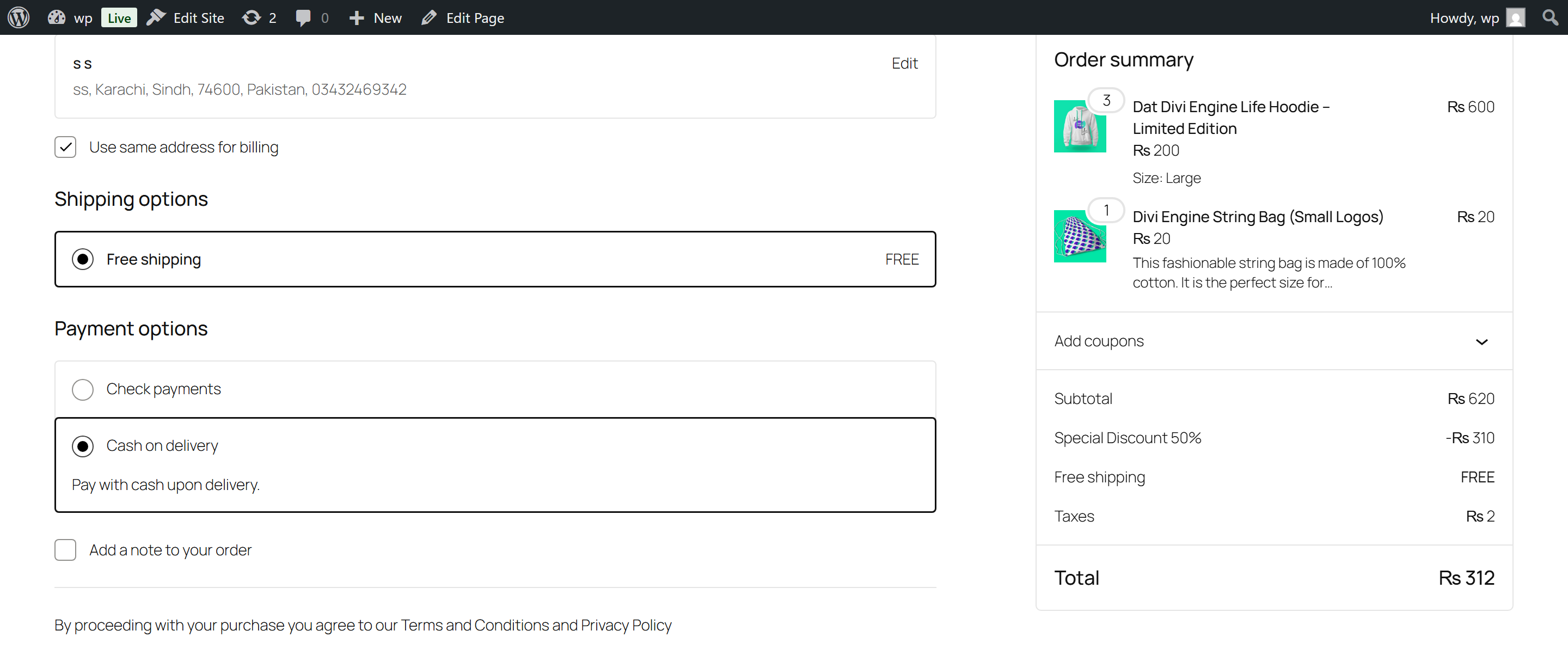


Installation
Automatic installation (recommended)
- In your WordPress admin, go to Plugins Add New
- Search for Murls Discounts
- Click Install Now, then Activate
- Go to WooCommerce Murls Discounts to set up your first discount
Manual installation
- Download the plugin ZIP from murls.co/murls-discounts or wordpress.org
- In your WordPress admin, go to Plugins Add New Upload Plugin
- Upload the ZIP file and click Install Now
- Activate the plugin
- Go to WooCommerce Murls Discounts to set up your first discount
Requirements
- WordPress 6.3 or higher
- WooCommerce 7.0.0 or higher
- PHP 7.4 or higher
FAQ
-
How do I set up my first discount?
-
Go to WooCommerce Murls Discounts. You will see a card for each payment method enabled in your store. Flip the toggle switch on any card, enter a discount amount, and click Save. That is it — the discount is now live.
-
Do customers need a coupon code?
-
No. The discount is applied automatically the moment a customer selects the qualifying payment method at checkout. There are no codes to create, share, or manage.
-
Does this work with the Block Checkout?
-
Yes. Murls Discounts fully supports both the classic WooCommerce checkout and the modern Gutenberg block-based checkout. Discounts apply and recalculate in real time on both.
-
Does it work with all payment gateways?
-
Yes. Any payment gateway that is enabled in WooCommerce is automatically detected and available to configure — Stripe, PayPal, bank transfer, cash on delivery, cheque, Mollie, Razorpay, and any third-party gateway plugin.
-
Can I set different discounts for different payment methods?
-
Yes. Each payment method has its own independent discount rule. You can offer 5% off for bank transfer, $3 off for cash on delivery, and no discount for credit card — all at the same time.
-
Can I limit the discount to specific product categories?
-
Yes. Enable category scope on any gateway rule, pick your categories, and only products in those categories will be discounted. Parent categories automatically include all their children — you do not need to select them individually.
-
Can I exclude certain products even if they are in a discounted category?
-
Yes. Add the product SKU to the exclusion list. That product will never receive the discount regardless of which category it belongs to.
-
Can I set a minimum order amount?
-
Yes. Each gateway rule has an optional minimum order amount. You choose whether that minimum is measured against the full cart total or only the products that qualify for the discount.
-
Can I schedule a discount for a specific date range?
-
Yes. Enable the schedule option and set a start and end date/time. The discount activates and deactivates automatically. Perfect for Black Friday, Christmas, or any time-limited promotion.
-
Will this conflict with WooCommerce coupons?
-
No. The discount is applied as a separate negative fee line item. It does not interact with WooCommerce coupon logic or stacking rules.
-
Will it conflict with other discount plugins?
-
Murls Discounts uses WooCommerce’s native cart fee API. It is compatible with any plugin that uses the same standard approach. If you experience a conflict, please contact support at murls.co/murls-discounts.
-
Does it work with WooCommerce Subscriptions?
-
The discount applies at the cart and checkout level. For the initial subscription checkout it works correctly. Compatibility with renewal orders depends on how your subscription plugin handles cart fees.
-
Is it compatible with HPOS?
-
Yes. HPOS (High-Performance Order Storage) compatibility is explicitly declared and fully supported.
-
How are taxes calculated with discounts?
-
Discounts follow your existing WooCommerce tax settings. The negative fee respects your tax configuration — whether prices include or exclude tax. No special setup needed.
-
Does the plugin collect any data?
-
No. All data stays in your WordPress database. No data is sent to external servers. No analytics tracking, no licence checks, no phone-home. Fully GDPR friendly.
-
Where can I get help?
-
Full documentation and support at murls.co/murls-discounts.
Reviews
There are no reviews for this plugin.
Contributors & Developers
“Murls Discounts – Flexible Discounts for WooCommerce” is open source software. The following people have contributed to this plugin.
Contributors
Translate “Murls Discounts – Flexible Discounts for WooCommerce” into your language.
Interested in development?
Browse the code, check out the SVN repository, or subscribe to the development log by RSS.
Changelog
2.0.0
- New: Category scope — limit discounts to selected product categories with include or exclude mode
- New: Automatic ancestor matching — selecting a parent category covers all child categories
- New: SKU exclusions — exclude specific products from the discount even within eligible categories
- New: Minimum order scope — choose whether the minimum applies to the full cart or eligible products only
- New: Date range scheduling — set start and end date/time per gateway rule
- New: Live checkout preview in admin — see exactly what the customer will see as you configure
- New: 30-day analytics dashboard — total discounts given, orders affected, active rules
- New: Discount events logged to order meta for reporting
- New: Redesigned admin interface — gateway cards, toggle switches, live badges, inset panels
- New: Welcome banner for first-time setup
- New: Shared calculator class — single source of truth for all discount calculations
- New: Static settings cache — one database read per request
- New: HPOS (High-Performance Order Storage) compatibility declared
- Fix: PHP 8.1 FILTER_SANITIZE_STRING deprecation replaced with correct sanitisation
- Fix: Duplicate nonce removed — settings_fields() handles verification
- Fix: Float comparison uses monetary epsilon instead of strict equality
- Fix: Block Checkout notice rendering restored
- Fix: wp.data.subscribe() properly scoped to prevent memory leaks
- Fix: Percentage discount preserves decimal precision (e.g. 2.5% stays 2.5%)
- Improvement: Zero-fee cleanup only recalculates when items were actually removed
1.3.1
- Fixed: Block checkout discount incorrectly applied in some configurations
- Tested: WordPress 6.3–6.9, WooCommerce 7.0.0–10.5.2
1.3.0
- Compatibility improvements and internal code cleanup
1.2.0
- New: Promotional messages for cart and checkout pages per payment gateway
1.1.0
- New: Fixed amount discount type
- New: Custom fee label with placeholders
1.0.0
- Initial release